Home / Articles / How I work with Claude: one session per topic, agents with names, and memory you curate
How I work with Claude: one session per topic, agents with names, and memory you curate
By Dinis Cruz · 2026-10-09 · v0.7.12 · claudeworkflowsessionsagentsmemorycontext-managementonboardingpromptsvaultsagent-behaviour-policycoworkguidearticle
Abstract: A practical guide to the way I work with Claude, written for the people joining the team and for anyone I am helping with their own agentic workflows. It comes from about a year of doing this every day. Keep sessions separate, one per major or recurring topic, and do not let a thread wander across topics. Name them, "project | what we are working on", and give agent sessions an @ name. An agent is a session with a focus and a role.md. What a session knows is what it reads, so curate that memory: my memory is a set of websites, graphs and vaults, wired together, and almost everything in it is open, which makes sharing with agents and people very cheap. Vaults are how agents receive and send information without broad permissions. With all of that in place, the review becomes the quality step: when I find a mistake now, I can usually trace it back to a brief that needed to be better. Then the tips: documents with a preview, small proof-of-concept sites, skills used with care, an Agent Behaviour Policy before every new connector, and a separate Cowork session for each agent at work. With starter prompts you can copy.
In short
- One session per topic. Every major or recurring topic gets its own Claude session, sometimes its own browser tab or window. Do not let a long thread mix topics.
- Name every session. "sgit.ai | website development", "RiskMandate | content development". Agent sessions get an @: @briefs, @inbox, @librarian.
- An agent is a session with a focus. A few documents that say what the project is, and a
role.mdthat says what this agent does and does not do. That is an agent. - Memory is what the session reads. Curate it. Mine is a collection of websites, graphs and vaults wired together, and the time I spend maintaining those files is the most productive time I spend.
- Access by default. Almost everything I do is published, which makes it very cheap for agents and people to find. Inside a company the same idea is "accessible by default": most content open to most people.
- Vaults are how agents share. An agent gets a vault key, not broad permissions, and reads and writes files there.
- Review is the quality step. When I find a mistake now, I can usually trace it to a brief that needed to be better, and I fix it there.
- Before you add a connector, write the policy. Connectors make Claude far more useful and far more dangerous. An Agent Behaviour Policy is what lets me connect more, comfortably.
The setup, Mermaid source
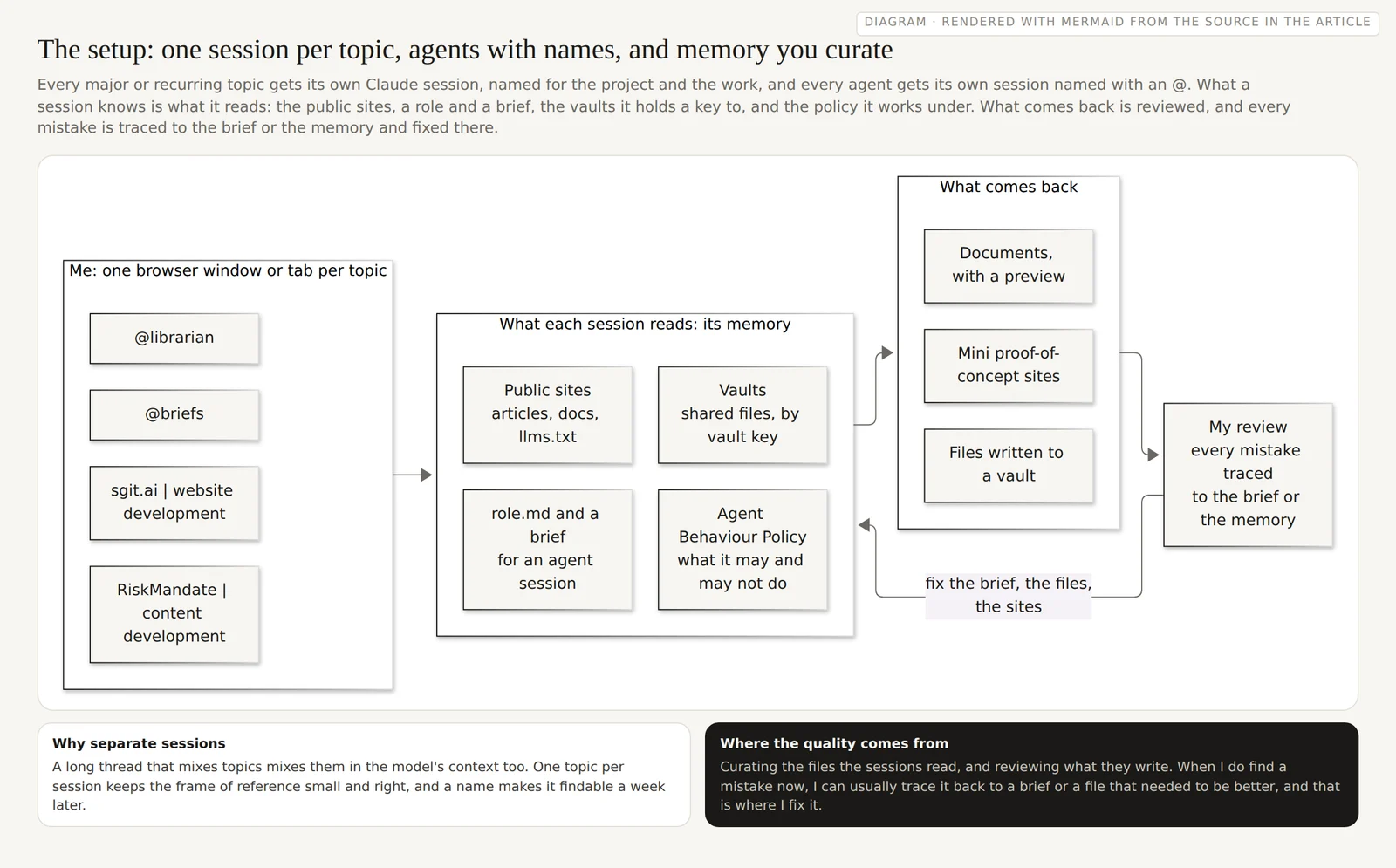
flowchart LR
  subgraph me["Me: one browser window or tab per topic"]
    direction TB
    S1["sgit.ai | website development"]
    S2["RiskMandate | content development"]
    S3["@librarian"]
    S4["@briefs"]
  end
  subgraph ctx["What each session reads: its memory"]
    direction TB
    W["Public sites<br/>articles, docs, llms.txt"]
    R["role.md and a brief<br/>for an agent session"]
    V["Vaults<br/>shared files, by vault key"]
    P["Agent Behaviour Policy<br/>what it may and may not do"]
  end
  subgraph out["What comes back"]
    direction TB
    D["Documents, with a preview"]
    M["Mini proof-of-concept sites"]
    F["Files written to a vault"]
  end
  RV["My review<br/>every mistake traced<br/>to the brief or the memory"]
  me --> ctx
  ctx --> out
  out --> RV
  RV -- "fix the brief, the files,<br/>the sites" --> ctx
One session per topic
The most important habit is the simplest one: keep sessions separate. I have a lot of Claude sessions open at any time, and each one is about one thing. Every major topic, and every topic that comes back regularly, gets its own session. Sometimes that session lives in its own browser tab or its own browser window, which makes it easy to move between them and easy to see what is open.
What I avoid is the long, mixed-topic thread. A thread is the model's frame of reference: everything in it is context for the next answer. Put three projects in one thread and the model starts to mix them, borrowing a name from one, a decision from another, an assumption from a third. It is not being careless. It is doing exactly what you asked, using everything in front of it. One topic per session keeps the frame of reference small and right.
The deeper version of this idea, that memory is context management, is in Memory is not a spectator sport. The practical version is: when the topic changes, open a new session.
Name every session
A session you cannot find is a session you will recreate, badly. So I name them, with a simple pattern: the project, a pipe, and what we are working on.
sgit.ai | website developmentRiskMandate | content developmentsgit | architecture conversations
Agent sessions get an @ in front of the role: @briefs, @inbox, @dev architect, @librarian. The @ tells me, at a glance, that in this session I am talking to an agent with a defined job, not having an open conversation. It also matches how the agents refer to each other in their files, which you can see in The agent team as it runs.
What an agent is
It sounds grander than it is. An agent is a Claude session with a particular focus. In practice:
- A few documents that explain the project: what it is, where it is going, what has been decided.
- A
role.mdfor this agent: its role, its responsibilities, what it may do, what it must not do, and where it writes. - A session that reads those before it does anything, and is named for the role.
That is enough to start. Talking to that agent is then a thread that is specific to it, and stays that way. The full version, with accounts, policies, a mailbox and a state machine, is in The agent team as it runs, and the step by step path from one session to a team is in Replicating the agentic inbox. Start with one agent and one role.md.
Memory is what the session reads, so curate it
This is where most of the quality comes from. The memory of a session is what it has read: the frame of reference it works from, and ultimately its whole universe for this project. If that is thin, out of date or contradictory, the work will be too.
My memory is not one place. It is a collection of websites, graphs, vaults, references and materials, wired together, so that an agent can start from one link and find the rest: this site and its llms.txt, the sites for behaviour policies, coding, non-functional requirements, Wardley maps and graphs, and the vaults behind them. The more time I spend curating and maintaining those files, the more relevant and accurate the agents are.
It also changes what the review is for. With the context this tight, I very rarely read something and think "where did that come from?". When I do find a mistake, I can usually trace it back to a brief that needed to be better, or a file that was missing or wrong, and that is where I fix it, so the next session does not make it. The review stops being a sign-off and becomes a QA step on the whole setup, which is the loop described in Agency is not a yes. It helps that Claude is good at checking things it is not sure of, if you ask it to: do not let it rely only on what it learned in training, ask it to check against a source.
Access by default
My approach to data governance is that almost everything is public. These articles, the memos behind them, often the sessions that produced them: they end up published. That is partly because so much of what I do is open source, but the main reason is efficiency. If you want to know the latest on RiskMandate or sgit, you, or your agent, can read the sites. Nothing needs to be sent, attached or explained twice.
Not everybody can do that, and it is not the point. The idea underneath is access by default, not public by default. Inside a company, most content can be available to most people, and that already gives agents most of the same benefit. Keep the things that must be private in places with their own keys, which is what encrypted vaults are for, and make the rest easy to find.
Vaults: how agents receive and send information
The websites are how information goes out. Vaults are how it moves between agents and people. Because a vault is easy to edit, it becomes a communication platform: one agent writes a brief, another reads it, writes its result next to it, and I read both.
The security property is the important one. To share a vault with an agent I hand over the vault key, and soon a public and private key pair, not broad permissions on an account or a drive. The agent can do what the key allows, in that vault, and nothing else. Read-only access is a read key. How this works for agents running in isolated places is in Encrypted memory for agents that run somewhere else.
Starter prompts
Four prompts I use, in some form, all the time. Replace the parts in angle brackets.
Starting a session on a project
This session is "<project> | <what we are working on>".
Before anything else, read <https://site/llms.txt> and <the two or three
pages that matter most>. Then tell me, in five lines, what the project is,
what is in flight, and what you think this session is for. Do not start
work until I confirm. When you are not sure of a fact, check it against a
source and tell me which one, rather than answering from memory.
Starting an agent session
You are @<role>. Read <link to role.md> and the project pages it points to,
then the Agent Behaviour Policy at <link>. Reply with: your role in three
lines, what you may do, what you must not do, and where you write your
output. Then wait for the first task.
Handing over a vault
Clone the vault with sgit using the key I give you below. Do not print the
key, do not write it to any file outside the clone, and do not include it in
anything you produce. Read README.md and the latest file in briefs/, then
summarise the brief in five lines and list what you need from me.
<vault key>
Ending a session
Before we stop: list what you changed, what you checked and against which
source, and what you are not sure of. Write a short debrief to <the vault
path or the document>, so the next session can start from it.
Tips
- Ask for documents, and read the preview. Claude is very good at producing a document and showing it rendered, or as markdown, in the session. Reading the rendered version is a better review than reading a wall of chat.
- Ask for a small proof of concept. It is just as good at building a mini website or a working example next to the conversation. A page you can click is often the fastest way to find out whether an idea holds.
- Use skills, with care. Skills are instructions and code that change what a session does. They are very effective, and they are also something you are loading into the agent's context and permissions. Read them before you turn them on, and prefer ones you or your team wrote.
- Write the policy before you add the connector. Every connector makes Claude more useful and more dangerous, because it extends what the session can reach. An Agent Behaviour Policy says what the agent may do with it, and which limits are enforced rather than hoped for, which is the difference Hope or enforcement measures. With the policies in place I am now comfortable connecting Claude to much more than I was.
- One Cowork session for each agent at work. For the more agentic workflows I create a separate Cowork session for each agent. In the Claude I use today, chat and Cowork have come together in one place, so this is less a different tool than a separate session per agent, with its own name, role and policy.
- Projects are fine, and I moved past them. Claude and ChatGPT both have projects, and I used them at the start. I find this workflow better because it makes me pay attention to the memory directly: which files, which sites, which vault, rather than whatever accumulated in a project.
Where to start
- Today: close the long mixed thread. Open one session per topic and name it "project | work".
- This week: write one
role.mdfor the agent you most need, open a session called@<role>, and use the agent starter prompt. - Then: make the memory findable. Put the project's key pages somewhere an agent can read, with an
llms.txtor an index page; inside a company, "accessible by default" is enough. - Then: share through a vault, with a key, instead of through broad permissions.
- Before every connector: write the policy.
- Every time you review: when something is wrong, fix the brief or the file it came from, not only the text in front of you.
Drafted from a voice memo and a follow-up note by Dinis Cruz, who is the author of the practice and the person with editorial responsibility, by agent@riskmandate.ai (Claude Opus 5.5, claude-opus-5-5) in the sgit.ai site session, on 9 October 2026. The statement that chat and Cowork have come together in Claude is the author's observation of the product he uses, not a claim checked against a product announcement. The prompts are examples to adapt, not a specification.
Threads
Builds on
- Memory is not a spectator sport: how a web of open sites, graphs and vaults became the memory for sessions like this one Agentic memory as context management: many published, fractal, provenance-carrying memories rather than one store, shown in the session that wrote the article.
- The agent team as it runs: one person, twelve agents, encrypted vaults, and a mailbox nobody sends from Twelve agents on dedicated accounts, encrypted vaults as the only memory, messages as files, a folder per person, and a mailbox nobody sends from.
- Replicating the agentic inbox: a walkthrough from one Claude session to a team of agents that never press send How to copy a working agentic email setup in phases: a mailbox and Claude seat of the agent's own, one session with a policy, then roles talking in files.
- Agency is not a yes: a scale for human and agent decisions, from rubber stamp to the reviewer who fixes the source A yes or no is not agency: seven dimensions, a seven-level scale for people and agents, and the review as a QA step that fixes the source.
- Why my agents do not run on my laptop: chat, Cowork and Code in the cloud, a vault as the shared drive, and the two walls an operating system has An OS has two hard walls, the kernel and the user; an agent on a laptop runs inside the one marked you, so the agents run in the cloud with a vault as shared drive.
- Encrypted memory for agents that run somewhere else: sgit deployment patterns, from a Mac mini to Kubernetes Agents in isolated, ephemeral places need memory that outlives them. Five sgit deployment patterns, from a Mac mini to Kubernetes, with ciphertext-only servers.
- Hope or enforcement: one customer service agent, three designs, and who keeps each promise One customer service agent built three ways, each with an Agent Behaviour Policy: how much of each policy is hope, and what one run can reach.