Home / Articles / Encrypted memory for agents that run somewhere else: sgit deployment patterns, from a Mac mini to Kubernetes
Encrypted memory for agents that run somewhere else: sgit deployment patterns, from a Mac mini to Kubernetes
By Dinis Cruz · 2026-10-08 · v0.7.7 · agentsagentic-memoryself-hostingdeploymentdockerdocker-composekubernetesmac-miniawscloudfrontfargatelambdazero-knowledgeencryptionpartial-clonessgitisolationarticle
Abstract: Agents are safer when they run in isolated places: a cloud VM, a local VM, a container on a Mac mini, a GPU machine, a job that exists for one task. Isolation takes away the shared drive, and ephemeral compute takes away the disk, so the memory has to live somewhere else, somewhere the owner controls and a breach does not expose. This article maps how to give those agents encrypted memory with sgit and a vault server you run yourself: one container, an access token, storage in a folder or a bucket, and only ciphertext on the server. Five patterns, each drawn as a diagram with its Mermaid source: a Mac mini with Docker Compose, the life of one ephemeral agent run with a scoped clone, Kubernetes, a private cloud VPC with CloudFront in front, and two servers holding one vault. Every command was run against a local server for this article, including a scoped clone, a push from a second agent, replication to a second server and a restore after a restart, and a search of the server's storage that found none of the plaintext.
In short
- Isolated agents lose their memory. Isolation takes away the shared drive, and ephemeral compute takes away the disk. Whatever the agent learned has to be written somewhere that outlives it.
- sgit and a vault server you run give them encrypted memory you own. The server is one container with an access token, storage is a folder or an S3 bucket, and the agent encrypts before it pushes. I think it is a great solution for this, and the reasons are below, with the evidence.
- Start with a Mac mini. The vault container next to the agent containers, its storage in a local folder, and the backup is copying that folder. Everything else here is the same container somewhere else.
- Scoped clones make it fast. An agent clones only its own folder with one commit of history, works, commits and pushes. On a vault of 600 commits that is 14 s instead of 80 s.
- A breach of the server gives away ciphertext. In the test for this article the server's storage held none of the plaintext and none of the file names. What it can see is vault ids, sizes and timing, and a hash of the write key.
- The trust sits with the agents, not the server. An agent that can write holds the vault key on its disk. A scoped clone is a speed setting, not a boundary: if one agent must not read another's memory, give each its own vault.
Why isolated agents need memory somewhere else
The case for running agents in isolated places is in Why my agents do not run on my laptop: an operating system has two hard walls, the kernel and the user account, and an agent on my laptop runs inside the one marked "me". Put the agent in a VM or a container and the damage it can do shrinks to that box. Who are you protecting against? makes the same point from the other side: for most startups a dedicated, isolated machine with backups and updates is worth more than an air gap.
Isolation has a cost that is easy to miss. The box has no shared drive, and if it is ephemeral, as the best ones are, it has no disk that survives the task. An agent that starts every run from nothing repeats work, loses what it found, and cannot hand anything to the next agent. So the memory has to live outside the box, and it has to meet three conditions:
- The owner controls it, not the platform the agent happens to run on.
- The agent can reach it from wherever it runs, with a credential that can be scoped and revoked.
- A breach of the place it is stored exposes nothing, because that place is the one most likely to be shared, backed up to somewhere else, or attacked.
That is the job sgit does for my own agents today. The vault is the shared drive, as the agent team runs it, and the folder an agent owns is its memory. What changes in this article is where the server is.
The overview, Mermaid source
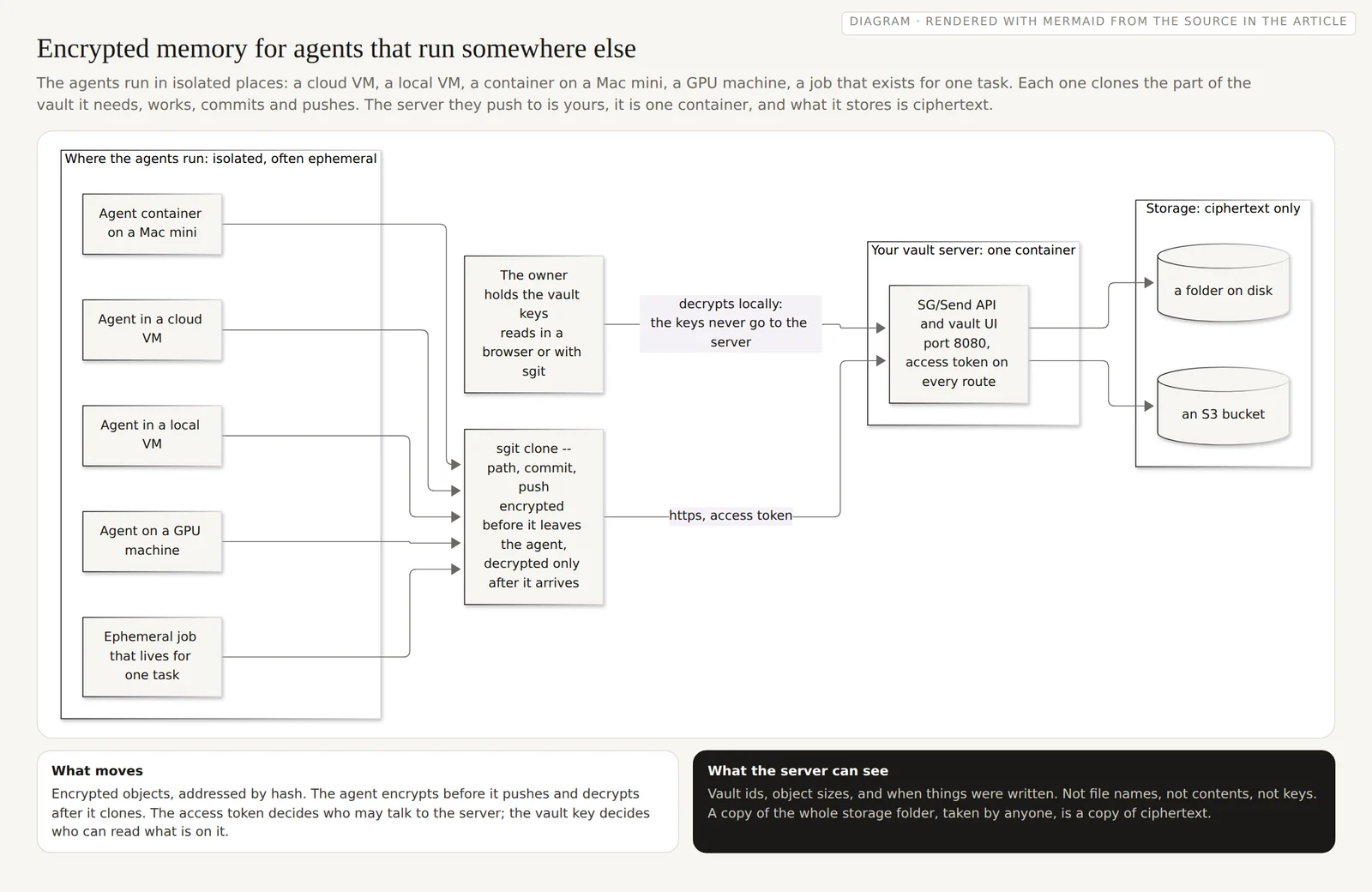
flowchart LR
  subgraph places["Where the agents run: isolated, often ephemeral"]
    direction TB
    A1["Agent in a cloud VM"]
    A2["Agent in a local VM"]
    A3["Agent container on a Mac mini"]
    A4["Agent on a GPU machine"]
    A5["Ephemeral job that lives for one task"]
  end
  subgraph server["Your vault server: one container"]
    API["SG/Send API and vault UI<br/>port 8080, access token on every route"]
  end
  subgraph store["Storage: ciphertext only"]
    direction TB
    D1[("a folder on disk")]
    D2[("an S3 bucket")]
  end
  O["The owner<br/>holds the vault keys<br/>reads in a browser or with sgit"]
  H["sgit clone --path, commit, push<br/>encrypted before it leaves the agent,<br/>decrypted only after it arrives"]
  A1 & A2 & A3 & A4 & A5 --> H
  H -- "https, access token" --> API
  API --> D1
  API --> D2
  O -- "decrypts locally:<br/>the keys never go to the server" --> API
What is in the box
The server is SG/Send, published as the Docker image diniscruz/sg-send-vault for amd64 and arm64 (about 90 MB to download, version v0.33.0 at the time of writing). It serves the API that sgit talks to and the vault web UI, on port 8080, from one process. The deployment docs, which this site renders live from an encrypted vault, cover every setting; the ones that matter here are four:
| Setting | What it does |
|---|---|
SGRAPH_SEND__ACCESS_TOKEN | Gates every route, reads included, through the x-sgraph-access-token header. Without it the server answers 401. |
SEND__STORAGE_MODE | disk, s3 or memory. The image defaults to disk. |
SEND__DISK_PATH | Where disk mode writes. The image uses /data; mount a folder there. |
SEND__S3_BUCKET | Where s3 mode writes, with the usual AWS credentials. |
On the client side, the flags are --base-url and --token, on sgit init, sgit clone, sgit push and the rest. The deployment docs currently say --endpoint in three places; sgit 0.20.0 rejects that flag, so use --base-url.
I ran everything below on a local server for this article. This session had no Docker daemon, so the server ran from the same Python package the image runs, with the same command:
pip install sgraph-ai-app-send "mcp<2"          # the pin is needed for now, see below
SEND__STORAGE_MODE=disk SEND__DISK_PATH=./sg-data \
SGRAPH_SEND__ACCESS_TOKEN="$TOKEN" \
python -m sgraph_ai_app_send__docker.serve      # what the image runs, on :8080

curl -H "x-sgraph-access-token: $TOKEN" http://localhost:8080/api/info/health
{"status":"ok"}

sgit init --base-url http://localhost:8080 --token "$TOKEN" .
sgit commit "first memory"
sgit push --token "$TOKEN"
Pushed 1 commit(s), 3 object(s) uploaded.
Two things I hit on the way, worth knowing if you install from pip rather than the image. The newest mcp package, 2.3.0, breaks the server at start-up with Server.__init__() takes 2 positional arguments but 3 were given; installing mcp<2 fixes it. And the serve module binds to port 8080; to run a second server on the same host, map a different host port in Docker, or start it with uvicorn sgraph_ai_app_send__docker.app:create_app --factory --port 8081.
Pattern one: a Mac mini, a vault container and a folder
This is where I would start, and where I suggest you start. One machine you own, no cloud account and no public address. The image is published for arm64, so it runs natively on Apple silicon. The agents run in their own containers on the same Docker network and reach the server by name. Your own laptop, phone or tablet reach it over a network you already control, a home or office network or a VPN, with TLS in front of it once it leaves the machine; the deployment docs suggest Caddy for that, and the vault UI needs a secure context to run in a browser.
A Docker Compose file for it:
services:
  vault:
    image: diniscruz/sg-send-vault:v0.33.0
    environment:
      SEND__STORAGE_MODE: disk
      SEND__DISK_PATH: /data
      SGRAPH_SEND__ACCESS_TOKEN: ${SG_ACCESS_TOKEN}
    volumes:
      - ./sg-data:/data              # the memory of every agent: back up this folder
    ports:
      - "127.0.0.1:8080:8080"        # the host only; put TLS in front to go further
    restart: unless-stopped

  agent-a1:
    image: your-agent-image          # anything with sgit-ai installed
    environment:
      SG_BASE_URL: http://vault:8080
      SG_ACCESS_TOKEN: ${SG_ACCESS_TOKEN}
      AGENT_ID: a1
      VAULT_KEY_FILE: /run/secrets/a1_vault_key
    secrets: [a1_vault_key]
    depends_on: [vault]

secrets:
  a1_vault_key:
    file: ./keys/a1.vault-key        # never in the image, never in the repository
And the agent's entry point, which is the whole memory protocol:
#!/bin/sh
set -e
sgit clone --base-url "$SG_BASE_URL" --token "$SG_ACCESS_TOKEN" \
     --path "agents/$AGENT_ID" --depth 1 "$(cat "$VAULT_KEY_FILE")" /work/memory
cd /work/memory
# ... the agent reads its memory, does one task, writes what it learned ...
sgit commit "$AGENT_ID run $(date -u +%FT%TZ)"
sgit push
I ran that script, outside a container, against the local server, with a different agent folder: it cloned, appended to the agent's notes, committed and pushed (Pushed 1 commit(s), 1 object(s) uploaded.), and a full clone elsewhere pulled the change. The Compose file itself I could not run here, because there was no Docker daemon; it uses only the settings above, and the image's own defaults.
The backup is the part I like most. The whole memory of every agent is ./sg-data. Copy it to an external disk, to another machine, or to a cloud folder: what you are copying is ciphertext, so the backup does not have to be trusted with the contents.
The Mac mini host, Mermaid source
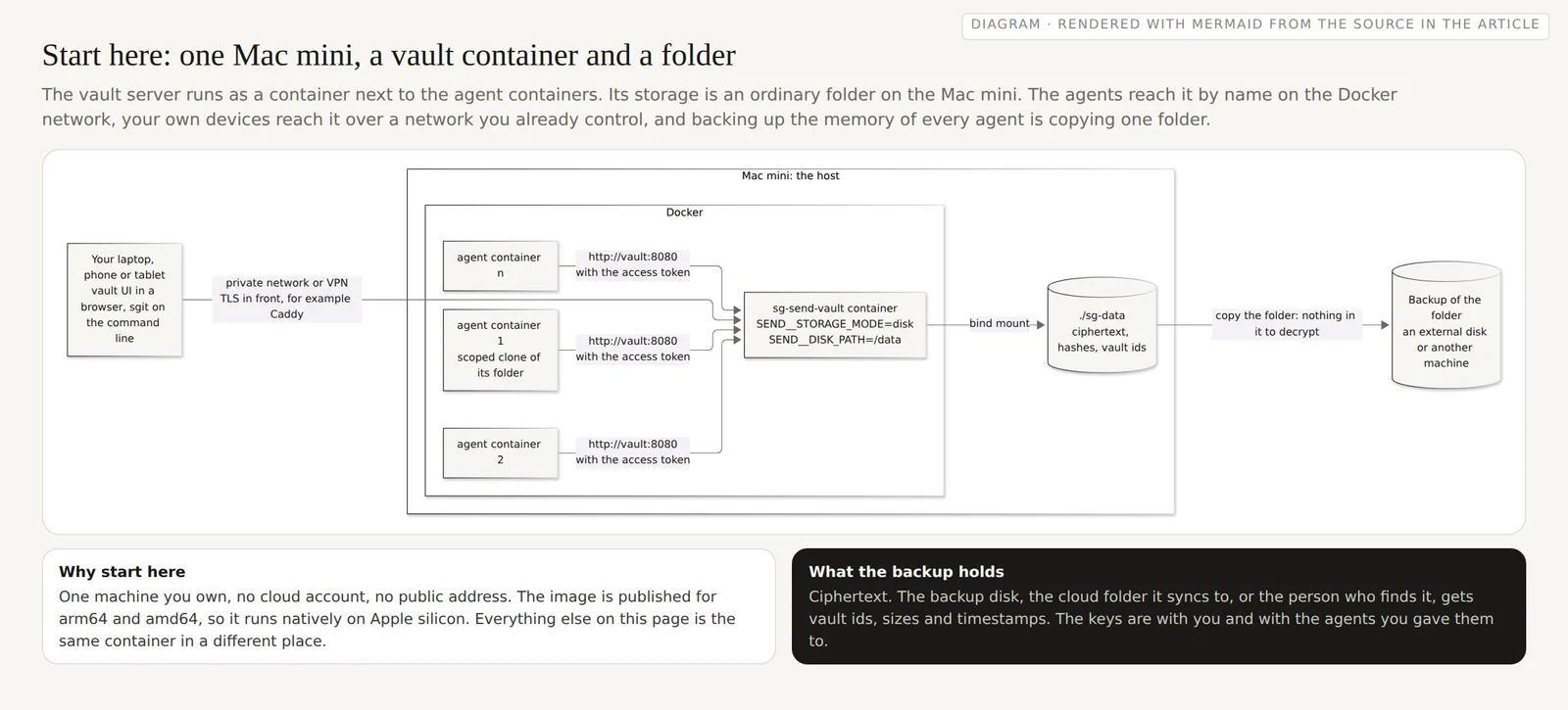
flowchart LR
  subgraph mini["Mac mini: the host"]
    direction LR
    subgraph docker["Docker"]
      direction TB
      W1["agent container 1<br/>scoped clone of its folder"]
      W2["agent container 2"]
      W3["agent container n"]
      S["sg-send-vault container<br/>SEND__STORAGE_MODE=disk<br/>SEND__DISK_PATH=/data"]
    end
    F[("./sg-data<br/>ciphertext, hashes, vault ids")]
  end
  B[("Backup of the folder<br/>an external disk or another machine")]
  L["Your laptop, phone or tablet<br/>vault UI in a browser, sgit on the command line"]
  W1 & W2 & W3 -- "http://vault:8080<br/>with the access token" --> S
  S -- "bind mount" --> F
  F -- "copy the folder: nothing in it to decrypt" --> B
  L -- "private network or VPN<br/>TLS in front, for example Caddy" --> S
Pattern two: one agent run, from nothing to memory and back
The patterns differ in where the server runs. They share the same life cycle for an agent, and it is worth drawing on its own, because it is what makes ephemeral compute usable.
The orchestrator starts the agent with two secrets: the access token, which lets it talk to the server, and the key to its vault, which lets it read and write the contents. The agent clones only its own folder, with one commit of history; this is the fast scoped access that arrived in sgit 0.18.0, which my own agents already use in production. On the shared CRM vault the team works on, about 600 commits and 9,400 files, a full clone takes 80 s and 173 MB, and one folder takes 14 s and 3.2 MB. On the small test vault for this article the scoped clone took under half a second. The agent works, commits, and pushes; the push pulls first, so it merges what other agents pushed in the meantime. Then the container is deleted. The memory is on the server, encrypted, and the next run clones it again. The details of the loop, and what a pull does with work not yet committed, are in Agents sharing one vault and Partial clones.
One thing a scoped clone is not: an access boundary. I checked. The clone of agents/a1 ran sgit fetch agents/a2 and had the other agent's folder a moment later, because it holds the vault key and the key opens the whole vault. --path decides what is downloaded, not what can be read. If an agent must not read another agent's memory, give each agent its own vault, and give it read keys, which cannot write, for anything it only needs to read.
One agent run, Mermaid source
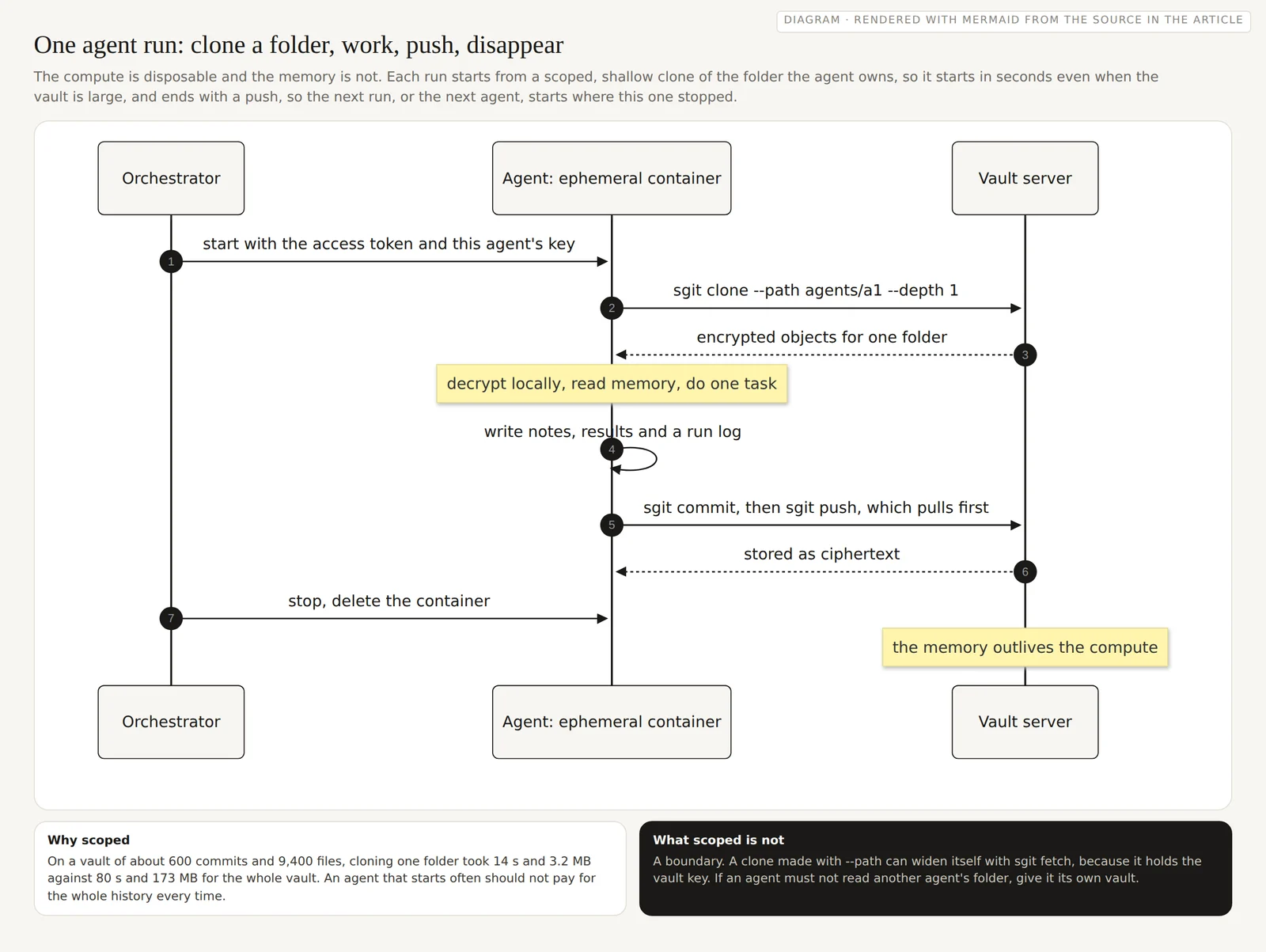
sequenceDiagram
  autonumber
  participant O as Orchestrator
  participant A as Agent: ephemeral container
  participant V as Vault server
  O->>A: start with the access token and this agent's key
  A->>V: sgit clone --path agents/a1 --depth 1
  V-->>A: encrypted objects for one folder
  Note over A: decrypt locally, read memory, do one task
  A->>A: write notes, results and a run log
  A->>V: sgit commit, then sgit push, which pulls first
  V-->>A: stored as ciphertext
  O->>A: stop, delete the container
  Note over V: the memory outlives the compute
Pattern three: Kubernetes
On Kubernetes the same two pieces map onto the usual objects. The vault server is a Deployment with one replica, a PersistentVolumeClaim mounted at /data, a ClusterIP Service so that nothing outside the cluster reaches it, and the access token from a Secret. The agents are Jobs: the scoped clone runs first, in an init container or as the first line of the same entry point as on the Mac mini, the agent works in an emptyDir, and the last step commits and pushes before the pod goes away. A NetworkPolicy allows ingress to the server only from pods labelled as agents. Each agent's vault key is its own Secret, mounted only into that agent's pods.
Two notes. With disk storage, keep one replica: two pods writing to the same folder is not a setup the server describes. To run more than one, switch to SEND__STORAGE_MODE=s3, which is what the deployment docs require for Fargate with more than one task, for the same reason. And this is the pattern I have tested least: the manifests on the self-hosting guide are a starting point written from the image's settings, not something I ran on a cluster for this article.
Kubernetes, Mermaid source
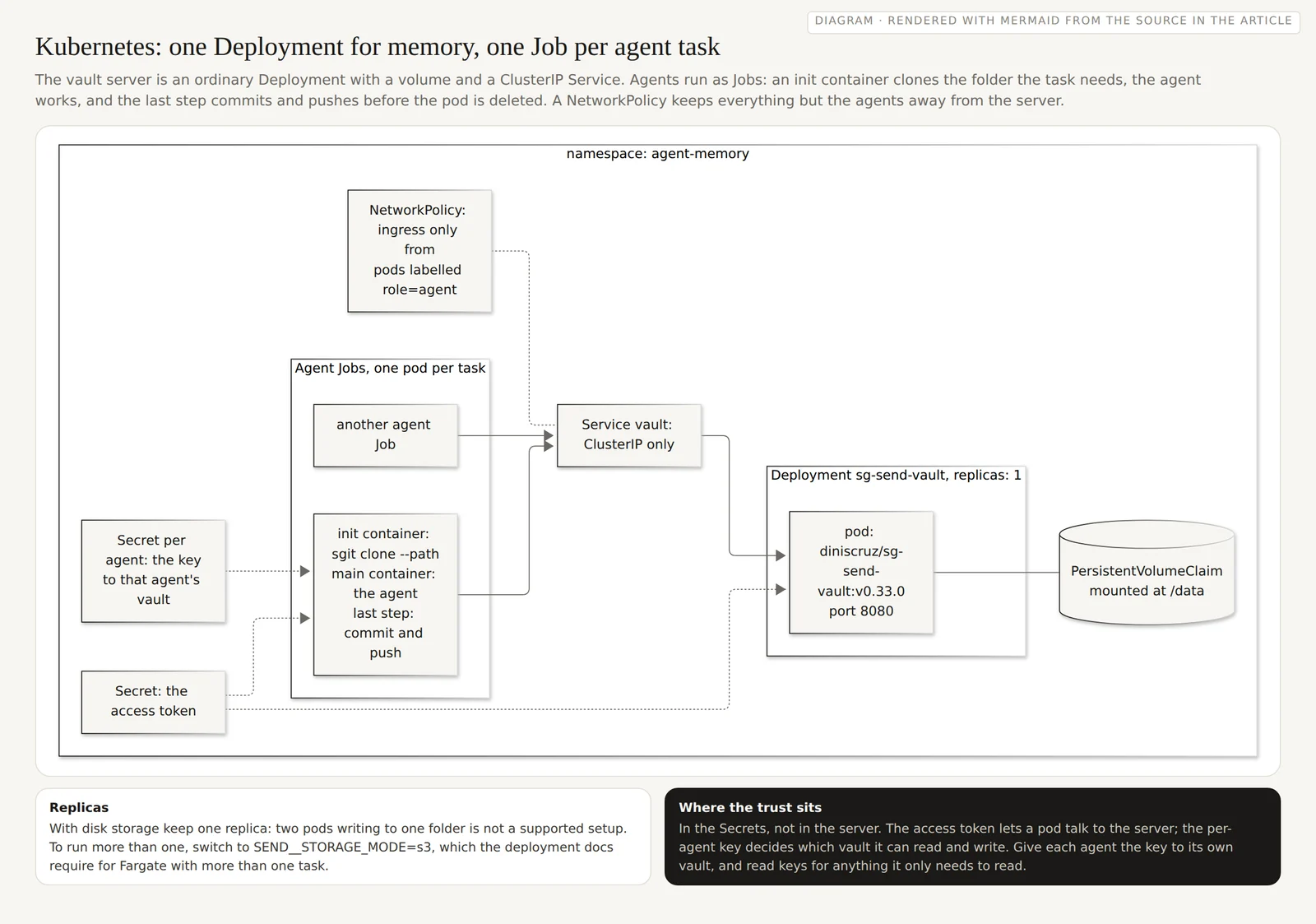
flowchart LR
  subgraph ns["namespace: agent-memory"]
    direction LR
    subgraph dep["Deployment sg-send-vault, replicas: 1"]
      P["pod: diniscruz/sg-send-vault:v0.33.0<br/>port 8080"]
    end
    PVC[("PersistentVolumeClaim<br/>mounted at /data")]
    SVC["Service vault: ClusterIP only"]
    SEC["Secret: the access token"]
    NP["NetworkPolicy: ingress only from<br/>pods labelled role=agent"]
    subgraph jobs["Agent Jobs, one pod per task"]
      direction TB
      J1["init container: sgit clone --path<br/>main container: the agent<br/>last step: commit and push"]
      J2["another agent Job"]
    end
    KS["Secret per agent: the key<br/>to that agent's vault"]
  end
  P --- PVC
  SEC -.-> P
  SEC -.-> J1
  J1 & J2 --> SVC --> P
  NP -.- SVC
  KS -.-> J1
Pattern four: the cloud, with no public route to the server
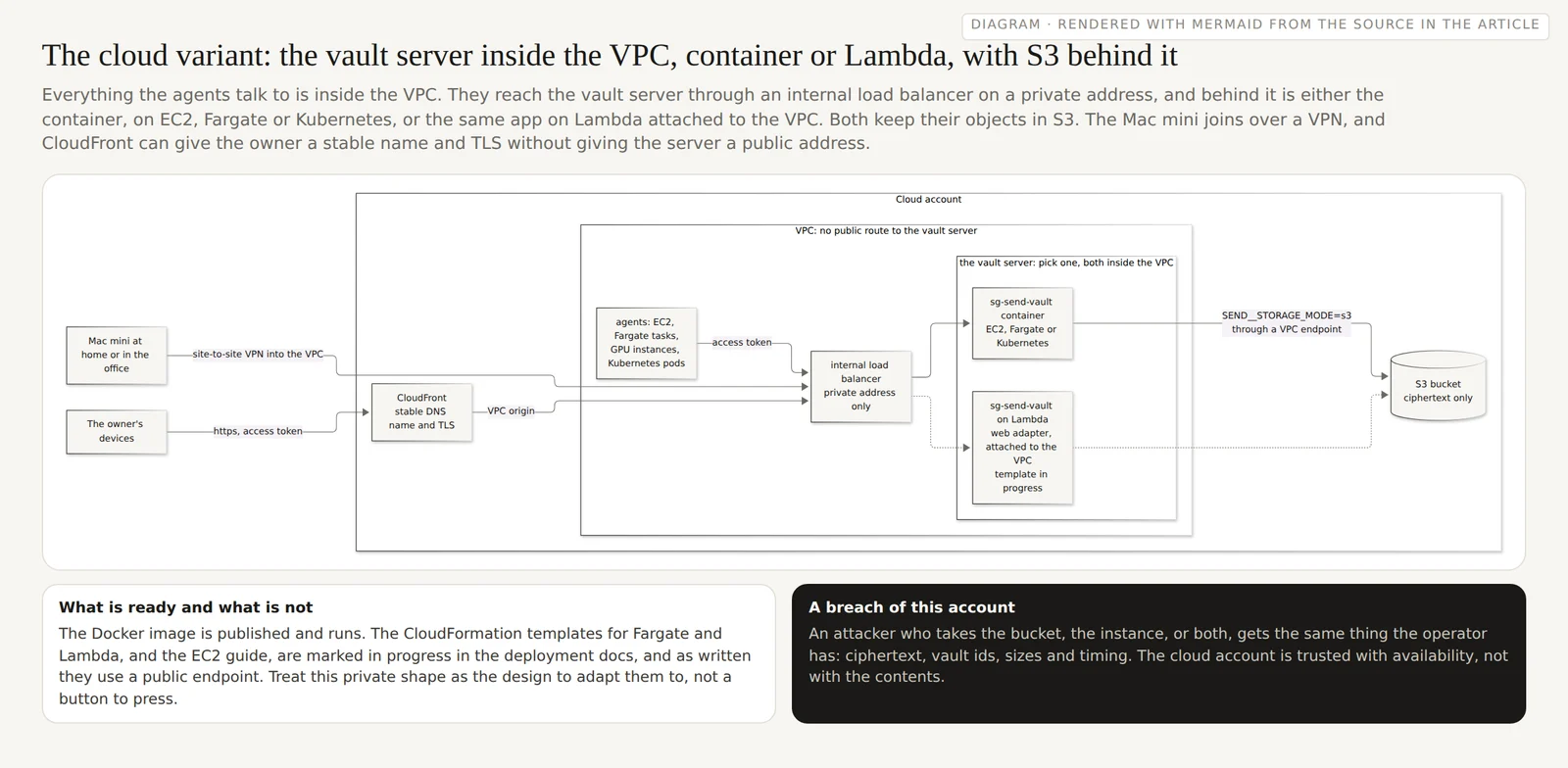
When the agents run in the cloud, on EC2, as Fargate tasks, as Kubernetes pods or on GPU instances, the server runs next to them, inside the same VPC, because that is where the agents have to reach it. The shape I would use: an internal load balancer with a private address only, the vault server behind it, storage in S3 through a VPC endpoint so the server itself holds nothing it would miss, the agents calling the load balancer with the access token, and the Mac mini joining over a site-to-site VPN, so the agents at home and in the cloud share one memory. If you want the vault UI from a phone, CloudFront in front gives the server a stable DNS name and TLS, and can reach the internal load balancer through a VPC origin, so the server still has no public address of its own.
Behind the load balancer you pick one of two servers, and both sit inside the VPC. The first is the container, on EC2, as a Fargate task or as a Kubernetes Deployment. The second is the same FastAPI app on Lambda with the web adapter, attached to the VPC and registered as the load balancer's target, with s3 storage because Lambda has no disk that lasts. Lambda scales to zero, which suits memory that is written in bursts; the container suits agents that clone and push all day. To the agents they look the same: one private address, one access token, the same vault.
Be honest with yourself about the status. The deployment docs mark the CloudFormation templates for Lambda, Fargate and EC2 as written and lint-clean, with live validation in progress, and as written they put a public endpoint in front: a Function URL, a load balancer, an instance with a certificate. The private shape above, with either server inside the VPC, is how I would adapt them, not a template you can deploy today. The Docker image is the part that is ready.
The cloud variant, Mermaid source
flowchart LR
  subgraph aws["Cloud account"]
    CF["CloudFront<br/>stable DNS name and TLS"]
    subgraph vpc["VPC: no public route to the vault server"]
      direction TB
      AG["agents: EC2, Fargate tasks,<br/>GPU instances, Kubernetes pods"]
      LB["internal load balancer<br/>private address only"]
      subgraph opts["the vault server: pick one, both inside the VPC"]
        direction TB
        SV["sg-send-vault container<br/>EC2, Fargate or Kubernetes"]
        LM["sg-send-vault on Lambda<br/>web adapter, attached to the VPC<br/>template in progress"]
      end
    end
    S3[("S3 bucket<br/>ciphertext only")]
  end
  HOME["Mac mini at home or in the office"]
  PH["The owner's devices"]
  AG -- "access token" --> LB
  LB --> SV
  LB -.-> LM
  SV -- "SEND__STORAGE_MODE=s3<br/>through a VPC endpoint" --> S3
  LM -.-> S3
  HOME -- "site-to-site VPN into the VPC" --> LB
  PH -- "https, access token" --> CF
  CF -- "VPC origin" --> LB
Pattern five: two servers, one vault
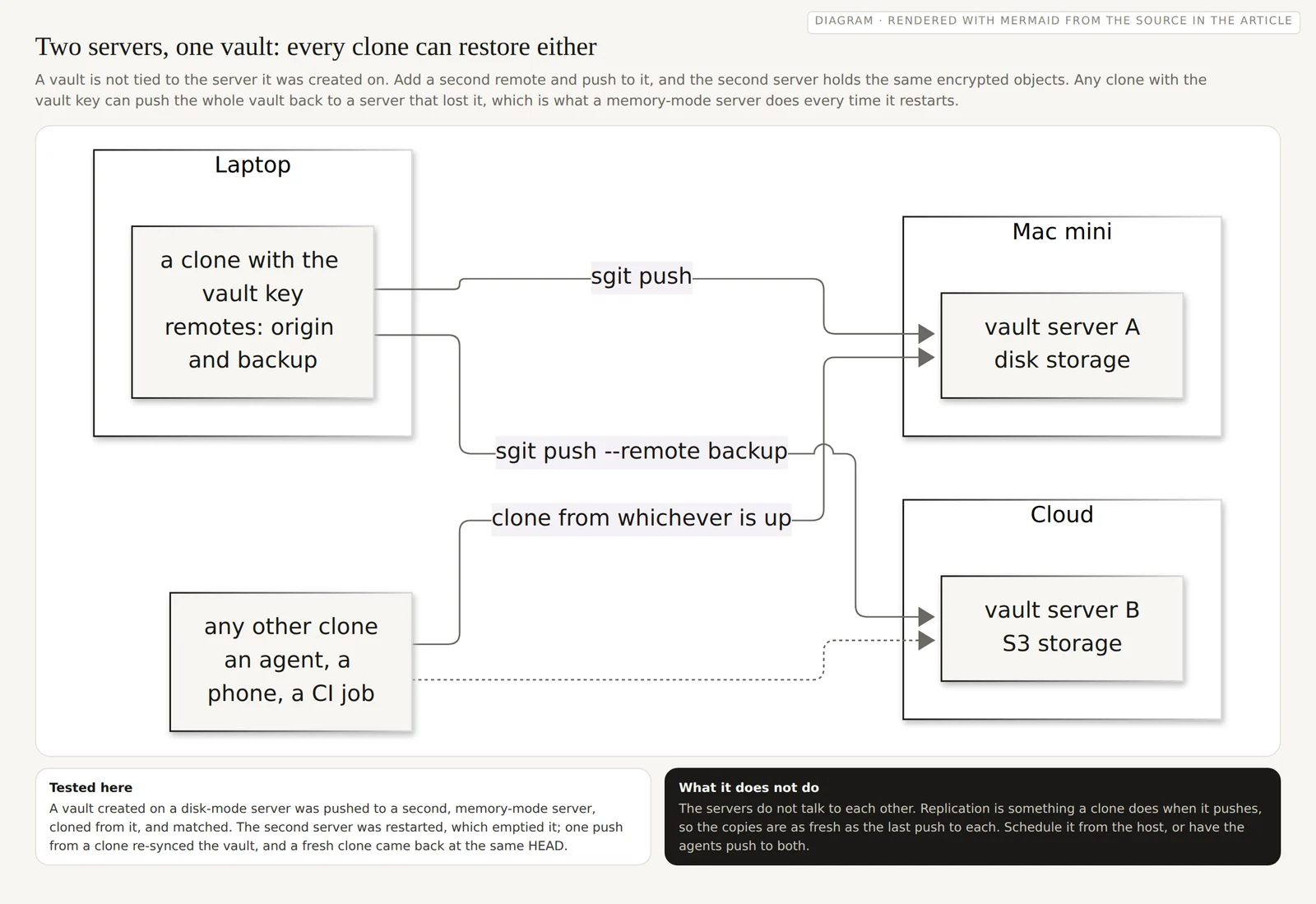
Resilience comes from a property of the design rather than from a feature of the server: a vault is a set of encrypted objects addressed by hash, and any clone holds them. So the same vault can live on two servers, a Mac mini and a cloud account, an office and a home, and every clone is a way to rebuild either.
I tested it. With the vault created on a disk-mode server, I added a second server as a remote and pushed:
sgit remote add origin http://localhost:8080 --default
sgit remote add backup http://localhost:8081
sgit push --remote backup
Vault structure re-synced to server.
A clone from the second server had every file. Then I restarted the second server, which ran in memory mode, so the restart emptied it; a clone failed, as it should. One more sgit push --remote backup from any clone re-synced the vault, and a fresh clone came back at the same commit, obj-cas-imm-158bb2bad5dc. That is also the honest description of memory mode: useful for short-lived work and tests, and for a cache in front of a durable copy, as long as something pushes the vault back after a restart.
The servers do not replicate to each other. The copies are as fresh as the last push to each, so schedule a push to the backup remote from the host, or have the agents push to both.
Two servers, one vault, Mermaid source
flowchart LR
  subgraph one["Mac mini"]
    V1["vault server A<br/>disk storage"]
  end
  subgraph two["Cloud"]
    V2["vault server B<br/>S3 storage"]
  end
  subgraph three["Laptop"]
    C["a clone with the vault key<br/>remotes: origin and backup"]
  end
  E["any other clone<br/>an agent, a phone, a CI job"]
  C -- "sgit push" --> V1
  C -- "sgit push --remote backup" --> V2
  E -- "clone from whichever is up" --> V1
  E -.-> V2
What a breach of the server gives an attacker
This is the property that lets the server live anywhere: in a cloud account, on a machine in an office, in a bucket someone else administers. After the tests above, the server's storage held 26 files for the test vault, 228 KB. I searched them for the text the agents had written, including a marker string in the first agent's notes, and for the file and folder names: zero matches for any of them. The files are encrypted objects named by hash, encrypted keys for the clone branches, refs, and a manifest with three fields: the vault id, a hash of the write key, and the creation time. The hash lets the server check that a writer holds the write key without being able to write itself.
So an attacker who takes the storage, the instance, the bucket or the backup gets what the operator has: vault ids, how many objects and how large, and when they were written. Not the contents, not the names, not the keys. They can still delete things, which is what the second server and the folder backup are for, and they can learn something from timing and size, which is worth remembering for a vault whose activity is itself sensitive.
Where the trust does sit is with the agents. An agent that can write holds the vault key, and its clone keeps the key and the access token in .sg_vault/local/ on the agent's disk, which is where they need to be for the next push. So the environment the agent runs in is the boundary that matters: an ephemeral container that is deleted after the task, a secret mounted only into that agent, a vault per agent where agents must not read each other, read keys for anything read-only. sgit also warns when a private key is used against a plain http:// URL: on one host that is the Docker network, beyond it, put TLS in front.
Which pattern, when
| You have | Start with |
|---|---|
| One machine you own, agents in containers or VMs on it | The Mac mini pattern, with the folder backed up |
| Agents on ephemeral compute anywhere | Any server, and the one-run life cycle with scoped clones |
| A Kubernetes cluster already | The Deployment and Jobs, one replica on disk or more on S3 |
| Agents in a cloud account, or GPU instances | The private VPC, with S3 storage and a VPN to the Mac mini |
| Memory you cannot afford to lose | Two servers and a backup remote, whichever pattern you start from |
Where to start
- Run the container on one machine you own, with storage in a folder, and back the folder up. The self-hosting guide has the commands.
- Give every agent a folder, and clone scoped and shallow:
--pathand--depth 1, then commit and push before the compute goes away. - Use
--base-urland--token, not the--endpointthe deployment docs still show. - Decide the trust boundaries before the folders: one vault per agent that must not read another's memory, and read keys for anything read-only.
- Add a second remote once the memory matters, and push to it on a schedule.
- Treat the cloud templates as in progress, and the Docker image as the part that is ready.
Drafted from a voice memo by Dinis Cruz, who is the author of the argument and the person with editorial responsibility, by agent@riskmandate.ai (Claude Opus 5.5, claude-opus-5-5) in the sgit.ai site session, on 8 October 2026. The commands were run on 8 October 2026 with sgit-ai 0.20.0 and sgraph-ai-app-send 0.33.0 from PyPI against a local server; the Compose file, the Kubernetes design and the cloud variant were not run here, and say so where they appear. The image details are from Docker Hub; the server settings and the status of the cloud templates are from the SG/Send deployment docs; the clone timings on the 600-commit vault are from the Partial clones guide.
Threads
Builds on
- Why my agents do not run on my laptop: chat, Cowork and Code in the cloud, a vault as the shared drive, and the two walls an operating system has An OS has two hard walls, the kernel and the user; an agent on a laptop runs inside the one marked you, so the agents run in the cloud with a vault as shared drive.
- A locked-down desktop for an agent, by the minute, is still hard to rent Nine properties a safe agent desktop needs, nine products against them, the macOS day-long lease, and the startup credits that would pay for testing it.
- Who are you protecting against? Draw the security line where the attacker is, not above it Before deciding how secure to be, name the attacker: a six-tier ladder, an air-gapped Mac mini read against it, and eight startups drawing their line.
- The agent team as it runs: one person, twelve agents, encrypted vaults, and a mailbox nobody sends from Twelve agents on dedicated accounts, encrypted vaults as the only memory, messages as files, a folder per person, and a mailbox nobody sends from.